
This document will guide you through the configuration and implementation steps that are necessary in order for your backend to be able to retrieve user’s test results.
The integration steps are as follows:
Authentication
Retrieve the results
Extra: Pre-registration
The health endpoint is listed below:
Environment | URL |
|---|---|
Production | |
Retrieve results | |
Retrieve anonymised results | https://health.yoti.com/admin-api/v1/anonymised-results?fromId=0 |
Pre registration |
Authentication
The health API uses an HTTP authentication scheme called ‘bearer authentication’. This involves security tokens called ‘bearer tokens’. They are the predominant type of access token used with OAuth 2.0. A resource should interpret a bearer token as "Give the bearer of this token access". The client must send this token in the Authorization header when making requests to protected resources.
Once you are onboard with us, login to your portal >> Head to "Settings" >> Type in an API key name with permissions enabled >> GENERATE KEY.
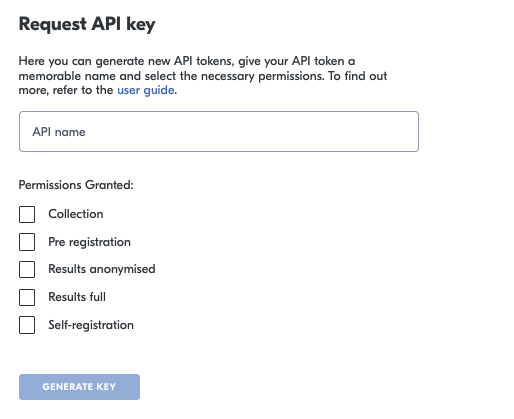
Permissions | Description |
|---|---|
Collection | Creating a sample. |
Pre registration | Add your customer’s information before testing. |
Results anonymised | Receive a generic report. |
Results full | Receive a detailed report including user information. |
Self registration | Integrate with other systems you are using to send customers their invites to self-register. This will allow you to get the unique urls per customer. The Self-registration API takes a flag that you can choose if the email is sent or not via the Health Portal. |
It is important that your API Key remains strictly confidential. It must be stored securely. We advise that you never commit any code containing your API Key, and never share it beyond the authorised party.
If you believe your API key has been compromised, please contact us as soon as possible. This can be done through your account manager or via our support desk by emailing clientsupport@yoti.com.
Header explained
The following elements are needed in the header:
Header | Description |
|---|---|
Authorization | API Key to call the Health API. This should be sent as a bearer token. |
Content-Type | application/json |
Collection
The collection endpoint allows you to create a sample via the api, instead of going through the normal bag collection flow.
Body explained
Pre-registration
This PUT endpoint will allow you to add your customer’s information before testing to speed up collection flow. Once a pre-registration is added this allows the you to search for the customer’s pre-registered data using one of the lookup fields such as email, phone, dateOfBirth .
All fields are optional but one of the below fields is required:
Field | Format |
|---|---|
Email address | |
Phone | Phone number format |
Date of birth | YYYY-MM-DD |
Body explained
Results
This GET endpoint allows you to retrieve the results of the tests performed within your organisation. Yoti gives you the option to collate anonymous results.
This endpoint will allow to fetch results from the given ID that is provided as the query parameter fromId. Specifying fromId=0 means fetching results from the start, the maximum limit is 400.
Hint The response will provide the lastId from which the next call should be made in order to fetch the remaining records (in case the response reports remaining>0).
Results full endpoint
Anonymised results endpoint
Body explained
See below for explanation on each property.
Self registration
This will allow you to send a self registration invite
Field | Type | Description |
|---|---|---|
org_id | Number | Your Org ID. |
fullName | String | The full name of the customer. |
phoneNumber | Number | The phone number of the customer. |
dateOfbirth | Date | The date of birth of the customer. This must be in the format: YYYY-MM-DD. |
String | The email address of the customer. | |
type | String |
|
send email | Boolean | Send customer an email. |
testingScheme | String |
|
Response body
Properties explained
Below describes each JSON property:
Field | Type | Description |
|---|---|---|
remaining | Number | Reports how many records are left to retrieve. |
lastID | Number | Reports the ID of the last record returned in this response. |
records | Array | A list of records containing test results and personal data if not anonymised. |
record.id | Number | The ID of this record. |
record.identityDetails | Object | Identity details of the user being tested. |
record.testDetails | Object | Details about the test and its result. |
record.symptoms (optional) | Object | Reported symptoms if they were collected at time of swabbing. |
Field | Optional | Type | Description |
|---|---|---|---|
identityVerified | ❌ | Boolean | Indicates whether a photo ID was verified for the user being tested. |
fullName | ✅ | Number | The full name of the user being tested. Includes first and last name and optionally middle names. If the split out name is also available the below given names and family name will also be populated. |
givenNames | ✅ | String | This includes first name and middle names if provided. |
familyName | ✅ | String | Family name of the user being tested. |
dateOfBirth | ✅ | String | The date of birth of the user being tested in the form: YYYY-MM-DD. |
gender | ✅ | String | The gender of the user being tested. Possible values:
|
nationality | ✅ | String | Nationality of the user being tested as an ISO/ICAO alpha-3 country code. |
healthNumber | ✅ | String | Health number (e.g. NHS number) of the user being tested. |
homeAddress | ✅ | Object | The home address of the user being tested. This is the address, post code and country. See below*. |
✅ | String | Email of the user being tested. | |
phoneNumber | ✅ | String | Phone number of the user being tested. |
contactAddress | ✅ | Object | The contact address of the user being tested. This is the address, post code and country. |
dateOfArrival | ✅ | String | Timestamp (UTC) of the date of arrival provided in the RFC3339 format, for example “2018-09-14T21:19:10Z” |
countryFrom | ✅ | String | The country the user has come from. |
countriesVisited | ✅ | Array | A list of the countries that a user has visited. |
flightNumber | ✅ | String | Flight number |
departureDate | ✅ | String | Timestamp (UTC) of the departure date provided in the RFC3339 format, for example “2018-09-14T21:19:10Z” |
vaccinationStatus | ✅ | String |
|
ethnicity | ✅ | String |
|
documentDetails | ✅ | String |
|
*Address explained:
Field | Type | Description |
|---|---|---|
addressLine1 | String | AddressLine1 is the first line of the address |
addressLine2 | String | AddressLine2 is the first line of the address |
addressLine3 | String | AddressLine3 is the first line of the address |
addressLine4 | String | AddressLine4 is the first line of the address |
postalCode | String | Postcode |
countryIso | String | CountryIso is the country where this address is in ISO-3166-1 alpha-3 format. |
Field | Optional | Type | Description |
|---|---|---|---|
uniqueId | ❌ | String | Contains an RFC 4122-compliant UUID which identifies a single test. |
testMethod | ✅ | String | Possible values are: “NAAT”, “RT-PCR”, “LFT”. |
manufacturer | ✅ | String | Reports who is the manufacturer of the test. |
testTypeIdentifier | ✅ | String | Uniquely identifies the test in case there are different tests with the same method from the same manufacturer. |
testingOrg | ❌ | String | Your organisation. |
sampleCollectAt | ❌ | String | Timestamp (UTC) at which the sample was collected, provided in the RFC3339 format, for example “2018-09-14T21:19:10Z” |
resultReportedAt | ❌ | String | Timestamp (UTC) at which the results were reported, provided in the RFC3339 format, for example “2018-09-14T21:19:10Z” |
testingMachine | ✅ | Object | If configured, this will report what machine was used for processing the test. |
testingMachine.id | ✅ | String | A unique ID to identify the machine. Could be a serial number or a UUID. |
testingMachine.name | ✅ | String | A name to quickly identify what machine was used. Example values: "MyGoPro", "ThermoFisher", "TestingCube", "GeneMeTestingMachine". |
location | ✅ | Object | The location at which the test was carried out. This is the address, post code and country. |
cqScore | ✅ | String | Only returned when applicable for the testMethod. Cycle of quantification indicating the cycle number where the amplification curve meets a predefined criteria. |
overallResult | ❌ | String | Reports the result of the test indicating if the virus or the antigen were detected. The result is marked as invalid in case it was not possible to carry out the test or in case the control indicates that the test was not valid. Possible values are:
|
Error codes
See error codes listed below:
Error code | Description |
|---|---|
400 | Malformed request |
500 | Unexpected server error |