This page provides information on the v1 API of this service, which is now regarded as legacy. For details on the v2 API, please refer to the link below:
Integration guide
Digital ID Match is a service that allows your business to check whether one of its users (new or existing) has a Yoti account by sending the user’s email address or mobile number to our API.
Yoti will respond with the result as to whether the user has a Yoti Digital ID app account with a verified ID, and if so, will enable the relying party to request that information securely via a Yoti QR share.
Users will receive a push notification on their phone that a search has been carried out. We will also send a POST notification to an endpoint that you specify in your request.
Important
You must inform the user that you are carrying out this search. Users are able to opt out of the search from within their Digital ID account.
To perform the search you must have an active Yoti service generated through the Hub.
Request Access
To use Digital ID Match, the service needs to be enabled for your organisation by the Yoti team. Please contact your account manager or our support team to request access.
POST https://api.yoti.com/did/v1/matches
You will need to ensure the latest version of the Yoti backend SDK is installed.
// Get the Yoti Node SDK library via the NPM registry
npm install yoti
// If you are using Maven, add the following dependency:
<dependency>
<groupId>com.yoti</groupId>
<artifactId>yoti-sdk-api</artifactId>
<version>3.11.0</version>
</dependency>
// If you are using Gradle, add the following dependency:
compile group: 'com.yoti', name: 'yoti-sdk-api', version: '3.11.0'
// Get the Yoti PHP SDK library via a Composer package
composer require yoti/yoti-php-sdk
# Get the Yoti Python SDK library
pip install yoti
// To install the Yoti NuGet package, you need to install NuGet Package Manager. After that, enter the following command in the console:
Install-Package Yoti
// For other installation methods, see https://www.nuget.org/packages/Yoti
// Simply add this as an import:
import "github.com/getyoti/yoti-go-sdk/v3"
// Or add the following line to your go.mod file
require github.com/getyoti/yoti-go-sdk/v3 v3.14.0
Once you have added the Yoti SDK to your project, the check can be performed as shown in the code snippet below:
const yoti = require("yoti");
const fs = require("fs");
const sdkId = "YOUR_SDK_ID";
const pem = fs.readFileSync("path-to-pem-file");
const body = {JSON_BODY}; //see below
const request = new yoti.RequestBuilder()
.withBaseUrl("https://api.yoti.com/did")
.withPemString(pem)
.withEndpoint("/v1/matches")
.withPayload(new yoti.Payload(body))
.withMethod("POST")
.withHeader("X-Yoti-Auth-Id", sdkId)
.build();
byte[] JSON_BODY = ... //see below
try {
SignedRequest signedRequest = SignedRequestBuilder.newInstance()
.withKeyPair("<YOTI_KEY_FILE_PATH>")
.withBaseUrl("https://api.yoti.com/did")
.withEndpoint("/v1/matches")
.withPayload(JSON_BODY)
.withHttpMethod("POST")
.withHeader("X-Yoti-Auth-Id", "<YOTI_CLIENT_SDK_ID>")
.build();
YourPojo yourPojo = signedRequest.execute(YourPojo.class);
} catch (GeneralSecurityException | URISyntaxException | IOException | ResourceException ex) {
ex.printStackTrace();
}
<?php
use Yoti\Http\RequestBuilder;
use Yoti\Http\Payload;
$JSON_BODY = [
... //see below
];
$request = (new RequestBuilder())
->withBaseUrl('https://api.yoti.com/did')
->withPemFilePath('<YOTI_KEY_FILE_PATH>')
->withEndpoint('/v1/matches')
->withPayload(Payload::fromJsonData(JSON_BODY))
->withHeader('X-Yoti-Auth-Id', '<YOTI_CLIENT_SDK_ID>')
->build()
//get Yoti Response
->execute();
// * For JSON data in Version >3 please use Payload::fromJsonData(JSON_BODY)
from yoti_python_sdk.http import SignedRequest, RequestHandler
import json
import requests
def execute(request):
response = requests.request(
url=request.url, data=request.data, headers=request.headers, method=request.method)
return response.content
def generate_session():
payload = {} # see below
payload_string = json.dumps(payload).encode()
signed_request = (
SignedRequest
.builder()
.with_pem_file("<YOTI_KEY_FILE_PATH>")
.with_base_url("https://api.yoti.com/did")
.with_endpoint("/v1/matches")
.with_http_method("POST")
.with_header("X-Yoti-Auth-Id", "<YOTI_CLIENT_SDK_ID>")
.with_payload(payload_string)
.build()
)
# get Yoti response
response = signed_request.execute()
response_payload = json.loads(response.text)
using System;
using System.IO;
using System.Net.Http;
using System.Text;
using Microsoft.AspNetCore.Mvc;
using Yoti.Auth.Web;
HttpClient httpClient = new HttpClient();
StreamReader privateKeyStream = System.IO.File.OpenText(_pemFilePath);
string serializedRequest = Newtonsoft.Json.JsonConvert.SerializeObject(new
{
JSON_BODY // See below
});
byte[] byteContent = Encoding.UTF8.GetBytes(serializedRequest);
Uri _baseUrl = new UriBuilder("https", "api.yoti.com", 443, "did").Uri;
Yoti.Auth.Web.Request DIDMatchRequest = new RequestBuilder()
.WithStreamReader(privateKeyStream)
.WithBaseUri(_baseUrl)
.WithEndpoint("/v1/matches")
.WithHttpMethod(HttpMethod.Post)
.WithContent(byteContent)
.WithHeader("X-Yoti-Auth-Id", "<YOTI_CLIENT_SDK_ID>")
.WithQueryParam("secure", true")
.Build();
// Send Request
HttpResponseMessage response = DIDMatchRequest.Execute(httpClient).Result;
import (
"io/ioutil"
"net/http"
"github.com/getyoti/yoti-go-sdk/v2/requests"
)
key, _ := ioutil.ReadFile("<YOTI_KEY_FILE_PATH>")
// Create request
request, _ := requests.SignedRequest{
HTTPMethod: http.MethodPost,
BaseURL: "https://api.yoti.com/did",
Endpoint: "/v1/matches",
Headers: map[string][]string{
"Content-Type": {"application/json"},
"Accept": {"application/json"}
"X-Yoti-Auth-Key": {"<YOTI_CLIENT_SDK_ID>"},
},
Body: func(data []byte, _ error) []byte {
return data
}(json.Marshal(jsonobj{ data }, // see below
})),
}.WithPemFile(key).Request()
//get Yoti response
response, _ := http.DefaultClient.Do(request)
{
value: "someone@mail.com", // +447444 444 444 - Must be an email address or phone number
notification: { // required
url: "https:/example.com/notification?example=query-param",
method: "POST",
verifyTls: true,
headers: {
"ANY-HTTP-HEADER": "the-header-value",
"ANOTHER-HTTP-HEADER": "another-header-value",
},
},
};
Key | Required | Description | Example Value |
|---|
value | Yes | This can either be the user's email address or phone number. Phone numbers must include the country code. | melissa.peterson@yoti.com +447444444444 |
notification | Yes | Yoti will send a notification with the results to an endpoint. You can specify any headers needed. |
|
url | Yes | The URL of your notification endpoint. Include any query parameters here. | https://yoti.com |
method |
| The API method for the notification. Default value is POST | POST |
verifyTls | No | Confirms that your notification endpoint needs TLS verification. | true |
headers | No | Any HTTP headers for your notification endpoint. |
|
A successful search will return a transaction ID and the result:
{
"id": "a-unique-transaction-id",
"result": "NO_ACCOUNT_FOUND"
}
{
"id": "Yzt0sbVOSauDWPwMQvumjQ",
"status": 400,
"error": "INVALID_PAYLOAD",
"message": "An error message from the server"
}
{
"id": "Yzt0sbVOSauDWPwMQvumjQ",
"status": 401,
"error": "INVALID_REQUEST_SIGNATURE",
"message": "Invalid request signature"
}
{
"id": "Yzt0sbVOSauDWPwMQvumjQ",
"status": 403,
"error": "DISABLED_APP",
"message": "An error message from the server"
}
{
"id": "Yzt0sbVOSauDWPwMQvumjQ",
"status": 500,
"error": "INTERNAL_SERVER_ERROR",
"message": "An error message from the server"
}
Transaction ID
You should record this ID and securely store it together with the searched email address or phone number. If a user reports on their Digital ID app that the search was not triggered by them, you can cross-reference this information with the webhook notification (detailed below).
Result | Description |
|---|
NO_ACCOUNT_FOUND | An account could not be found matching the provided email or phone number. |
UNVERIFIED_ACCOUNT_FOUND | An account was found linked to the email or phone number, however the account does not have a verified ID added. |
VERIFIED_ACCOUNT_FOUND | An account was found linked to the email or phone number, and the account has a verified ID added. |
Status | Response |
|---|
201 | Created |
400 | Bad Request |
401 | Unauthorized |
403 | Forbidden |
500 | Server Error |
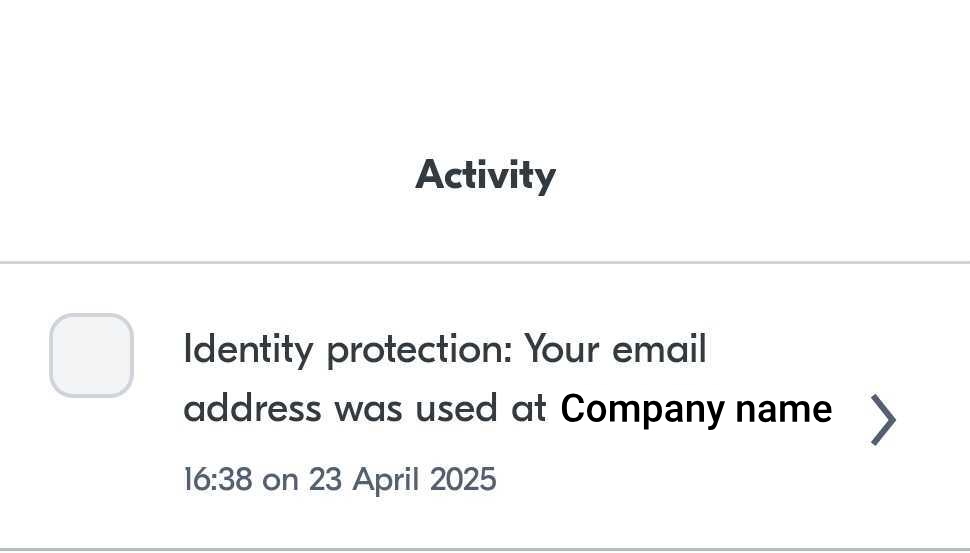
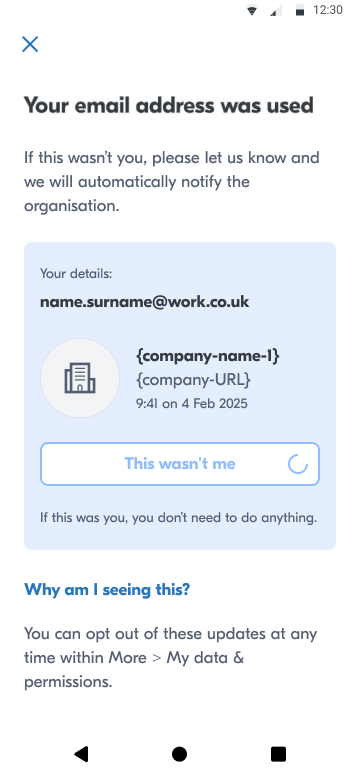
When performing the search, if the user has a Yoti Digital ID account, they will receive a push notification informing them that the search has taken place. This will also appear in their Activity tab. They will then have the option to confirm whether or not they agree to this.
Example:
The Company name will be the external name of your Yoti application used for performing the match. The Company URL will be the URL in the application settings. See here for information on the application set up.
Within the body you must specify an endpoint for a POST notification. This notification is sent to your backend when a user receives the push notification to their app account and actions that it is not them.
{
"specversion": "1.0",
"id": "Y2el8YXnCTN6d2xa8ENADdKkE21EdNK-_CuSZrkmdHA4UdqsSD2mAXuCwLlZmZDw",
"type": "com.yoti.connect.event.did.not-me",
"source": "urn:yoti:connect:did",
"time": "2025-05-27T12:55:04.199Z"
}
Any webhook notification sent via our Digital ID service will have the same payload as defined by Cloud Events specification.
Value | Details |
|---|
specversion | Version number of the Events Spec |
id | The unique transaction ID from the initial response |
type | Yoti notification type |
source | Yoti service sending the notification |
time | The time the user confirmed it wasn't them in UTC. |