Yoti Age Verification gives people simple ways to prove their age, using things like a selfie or a mobile number. Designed to maintain user privacy and only share the result of the age check with a business, it’s an easy way to deliver age-appropriate services without collecting user data.
This section will guide you through the implementation steps for our age verification service API on mobile or web, and leverage our hosted web user interface. This incorporates multiple Yoti products and provides all user interaction. There are also options to integrate without our UI.
Feature List
The methods that can be added to the Age Verification Service are:
Service | Description | Coverage | Data requested |
|---|---|---|---|
Age estimation | The user has their age estimated based on facial analysis from a real-time selfie. | Global | Real-time selfie using the camera on the device. |
Digital ID | User shares an Over Age from their Yoti app by scanning a QR code. | Global | ID document and biometric selfie in the Digital ID app. OR Age estimated. |
Identity document verification | User uploads a scan of their ID document and a selfie (optional). | Global | ID document and biometric selfie. |
Credit card | User enters their credit card details, which are verified against the database. | Global | PAN number, expiry date, CV2 number, zip code. |
Mobile provider | User enters their mobile number, which is verified against the database. | Regional | Name, address, and date of birth. |
Database | The user’s details are checked against a database. | Regional | Mobile provider details. |
Email address | Yoti checks the email source, if it is linked to an employer, and for any financial transactions tied to it. | Regional | Country code + email address |
Swedish Bank ID | The user uses their digital ID card to prove their age. | Sweden | Digital ID |
FTN | The user uses their digital ID card to prove their age. | Finland | Digital ID |
MIT ID | The user uses their digital ID card to prove their age. | Denmark | Digital ID |
Double anonymity | Yoti is compliant with "An age verification system using double anonymity must not allow services covered by this framework to recognise a user who has already used the system, based on data generated by the age verification process." | Regional | N/A |
Social Security Number | Yoti verifies if the SSN number is real and matches it with a third-party supplier. | US | Name, date of birth, zip code and last 4 digits of their SSN number. |
LA Wallet | Louisiana residents can scan a QR code to share an age attribute from their Louisiana-issued LA Wallet. | US - Louisiana | Digital ID |
US Partner | Yoti Age Verification works with a network of partners, including a US-owned and controlled company, to perform age verification. | Florida | Enable at least one of Doc Scan / FAE / DID, threshold value and no of max retry |
CPF Number | Yoti verifies that the CPF number and date of birth provided by the user are real and match them with tax authority records. | Brazil | CPF number and date of birth |
Age Token | Age tokens give users continued access to your site without having to prove their age again, meaning less user friction and lower costs. | Global | N/A |
Yoti Key | Allowing users to prove their age just once and keep accessing your platform time and time again. | Global | N/A |
Three types of age checks are available:
A standard AGE check that returns the age of a user.
An OVER check that informs you if a user is over a defined age threshold, but protects the user’s details by not sharing their actual age. ⭐️ MOST POPULAR
An UNDER check that informs you if a user is under a defined age threshold, but protects the user’s details by not sharing their actual age.
The overview below sets out the entities and data flows involved.
The User Flow
The user will be asked to prove their age and will be taken through the Yoti verification steps, where they will be presented with the options you have selected. You will then need to redirect them to a success or error URL. Alternatively, you can listen to post messaging from the iframe.
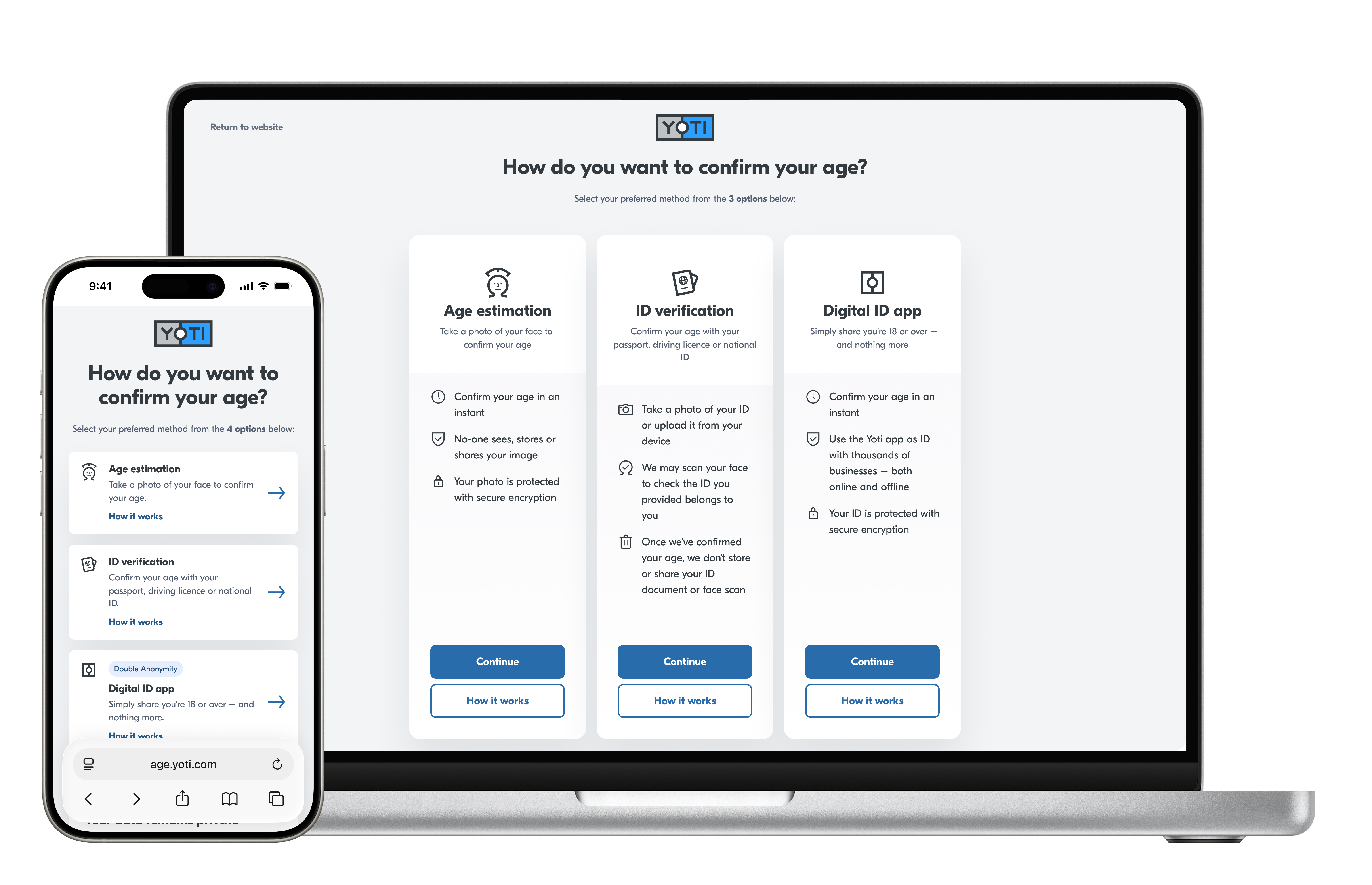
Hint Yoti offers customisation of this page.
Our product will guide the user through their chosen age-verification option.
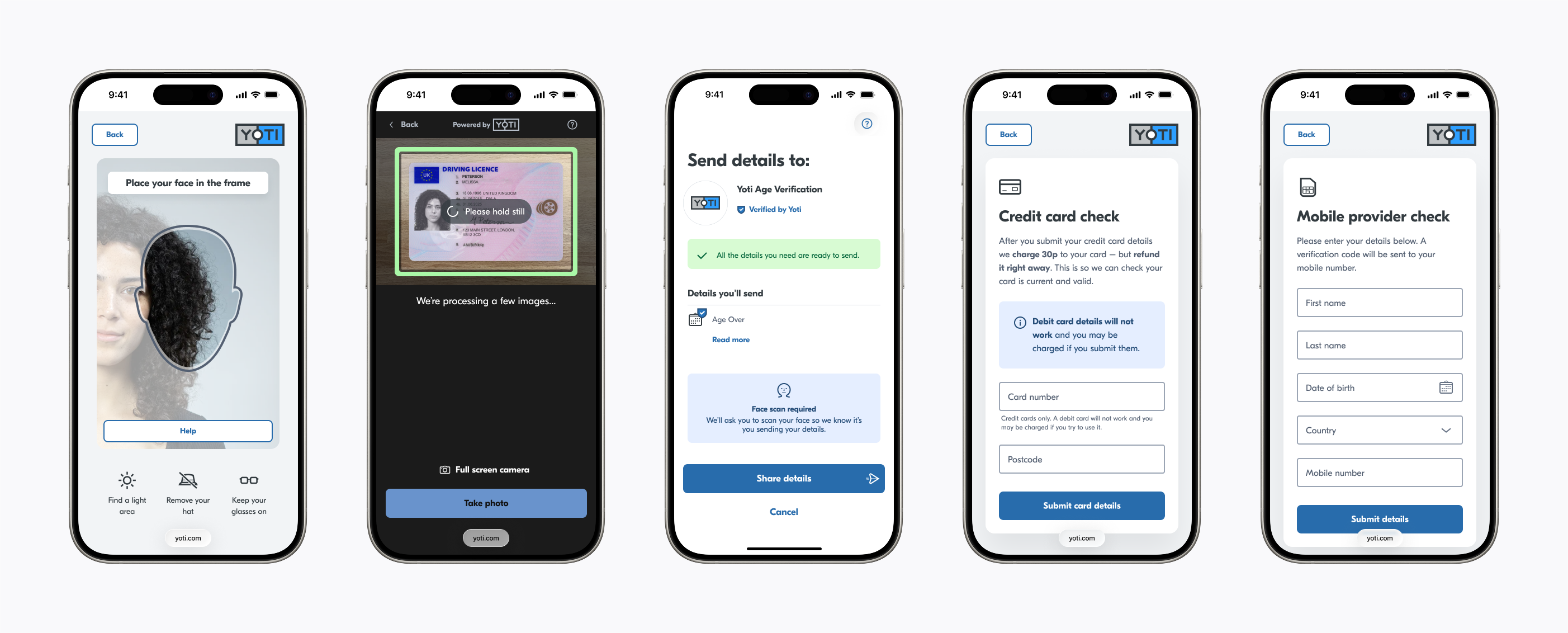
Translations supported
Our service will detect and support translations by browser locale settings. You can also pass the locale code as a query parameter to override the automatic selection.
Some languages are not yet available for the Doc Scan / Digital ID method. For queries around supported languages, please contact us via support.yoti.com
Here are the supported language translations in the Age Verification service:
Age Verification | Locale | Age Estimation | Doc Scan (IDV) | Digital ID (Yoti app) |
|---|---|---|---|---|
🇸🇦 Arabic (العربية) |
| ✅ | ✅ | |
🇧🇷 Brazilian Portuguese |
| ✅ | ✅ | ✅ |
🇧🇦 Bosnian (bosanski) |
| ✅ | ✅ | |
🇭🇷 Croatian (hrvatski) |
| ✅ | ||
🇩🇰 Danish (Dansk) |
| ✅ | ✅ | |
🇬🇧 English (UK) |
| ✅ | ✅ | ✅ |
🇺🇸 English (US) |
| ✅ | ✅ | ✅ |
🇫🇮 Finnish (Suomi) |
| ✅ | ✅ | |
🇫🇷 French (Français) |
| ✅ | ✅ | ✅ |
🇩🇪 German (Deutsch) |
| ✅ | ✅ | ✅ |
🇬🇷 Greek (Ελληνικά) |
| ✅ | ✅ | |
🇭🇺 Hungarian (Magyar) |
| ✅ | ✅ | |
🇮🇹 Italian (Italiano) |
| ✅ | ✅ | ✅ |
🇮🇩 Indonesian |
| ✅ | ✅ | |
🇯🇵 Japanese (日本語) |
| ✅ | ✅ | |
🇰🇷 Korean (한국어) |
| ✅ | ||
🌎 Latin-American Spanish (Español Latinoamericano) |
| ✅ | ✅ | ✅ |
🇲🇾 Malay |
| ✅ | ✅ | |
🇵🇱 Polish (Polski) |
| ✅ | ✅ | |
🇵🇹 Portuguese (Português) |
| ✅ | ||
🇷🇺 Russian (Русский) |
| ✅ | ✅ | |
🇷🇸 Serbian (српски) |
| ✅ | ||
🌍 Serbian (Latin) |
| ✅ | ✅ | |
🇨🇳 Simplified Chinese |
| ✅ | ✅ | |
🇸🇬 Simplified Chinese (Singapore) (简体中文) |
| ✅ | ✅ | |
🇪🇸 Spanish (Español) |
| ✅ | ✅ | |
🇸🇪 Swedish (Svenska) |
| ✅ | ✅ | |
🇵🇭 Tagalog |
| ✅ | ||
🇱🇰 Tamil (தமிழ்) |
| ✅ | ✅ | |
🇹🇭 Thai (ไทย) |
| ✅ | ✅ | |
🇹🇷 Turkish (Türkçe) |
| ✅ | ✅ | |
🇵🇰 Urdu (اُردُو) |
| ✅ | ||
🇻🇳 Vietnamese |
| ✅ | ✅ |
Using Yoti responsibly
We pride ourselves on how we handle our users' data. We use tech for good and enable users to securely prove their identity or age, always being transparent about what happens to their details.
Be transparent about why you're collecting data and only use this data for those reasons.
Only collect the information you actually need. Data minimisation is one of the main benefits of Yoti, so people don't have to provide more information than is actually necessary.
Make sure any information you export to your own systems is stored securely. Data security is at the heart of what we do, and we think it should be important to every organisation.