
Welcome to the developer documentation for integrating our Headless Age Verification.
This section will guide you through the implementation steps for our age verification service API on mobile or web, without the use of our age verification portal web UI. This API incorporates multiple Yoti products, leverages their individual SDKs and is purpose built to provide only age related attributes. It is particularly suited for native app integrations.
If you are looking to use our fully hosted Age Verification UI, including for Web integrations, please refer to Age verification instead.
You can integrate the following services using:
API An API integration
Service | Description |
|---|---|
Age estimation | User has their age estimated based on facial analysis from a real-time selfie. |
Doc scan | User uploads a scan of their ID document and a selfie (optional). |
Mobile | Optional OTP and age verification via a mobile phone number. |
Database | A check against third party databases, such as credit ref agencies. |
Electronic ID | Age verification through EID schemes. |
Age verification with a pre-existing verified email address. | |
Social security number | Yoti verifies if the SSN number is real and matches it with a third party supplier. |
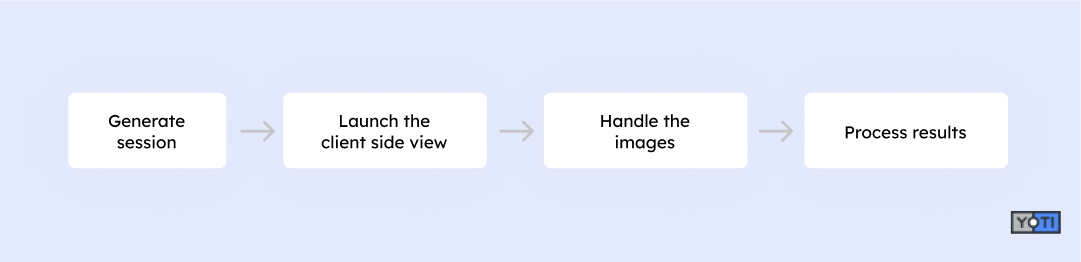
The integration steps vary according to each verification method. The following methods require creating a session for the client side view to launch. You can then integrate with our web client or mobile SDKs to perform the check:
Age estimation
Doc scan
A session represents one end-to-end request of the age verification service. The session identifier is in the create session request's response. As age estimation and doc scan require UI for capturing images, a session will be used to linked the frontend interface with the backend logics for Yoti to perform the checks. Once the image capturing module has launched, it will take the end user through the appropriate age capture flow. Once this flow is completed, the end user is redirected back to your application so that they may continue their journey. You are required to handle the redirection as well as sending the images to our APIs for verification.
The following methods are available as APIs and do not require creating any session:
Mobile
Database
Electronic ID
Email
Social security number

Help If you need any help please contact us here.