
HomeAge Verification HeadlessAI Services for TerminalsAge Estimation VerifySupportTrust APIIdentity Verification LivenessDigital IDIdentity verificationDigital ID MigrationDBS RTWDigital IDDBS/RTW portaleSignaturesAge verificationAge estimationIn-Branch VerificationAge Estimation v2idv-portal-errorsIdentity ProfilesVerifiable Credentialssandbox-betaIdentity Verification APIAI Services APITrust APIProof of Age (PoA) API
Identity verification
v9.0
Delete sessions
Good to know
A user will need to have specific permissions to perform these actions that can be added in Hub.
Delete the session
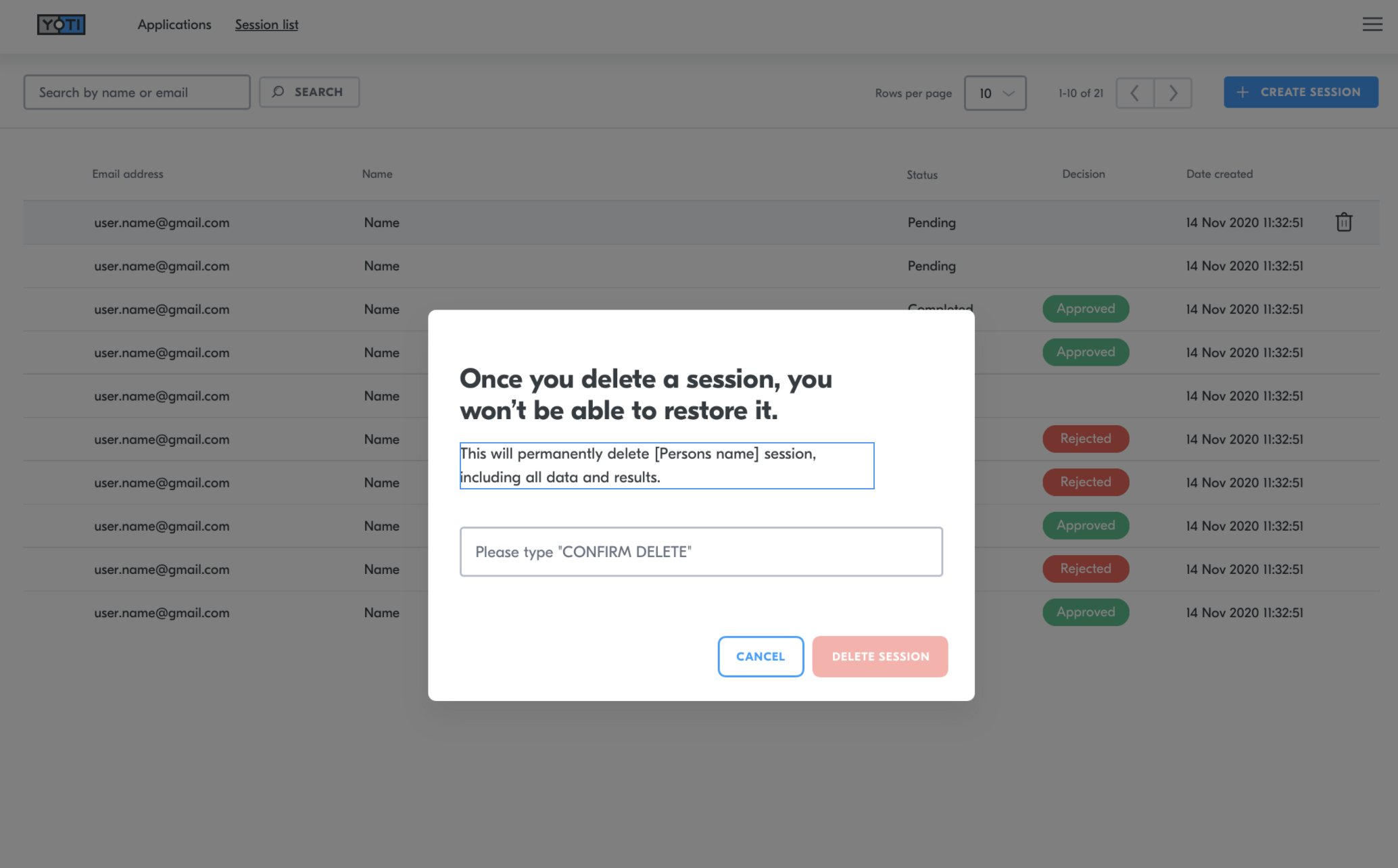
By deleting the session, you will be deleting all records of the session. This will remove the session from the session list and delete all media as well as the recommendations from Yoti, the session details and the decision you have added.
To do this you will need to:-
Navigate to the correct session
Click the bin icon on the right hand side of the session.
Type DELETE
Press DELETE SESSION
Video explainer
Last updated on
Was this page helpful?
Next to read:
Video explainerGot a question? Contact us here.
Video Learning Centre
SDK
Mobile
Sandbox
Usability
Legal & privacy
Stay updated