Welcome to the developer documentation for integrating Yoti AI services.
The documentation will show you how to complete direct integrations for:
- Facial Age Estimation (FAE)
- Liveness Check
- Terminals/Self-checkouts
With this integration type, you can:
- Create and design your own user flow
- Store images of the user
- Get the actual age and standard deviation score.
We strongly recommend you enhance your integration by using our add-on services:
- Anti-spoofing (Liveness)
- Face Capture Module (FCM)
- Secure Image Capture (SICAP)
If you are in the adult industry, we strongly recommend you integrate our Age Verification Service instead to be compliant.
Technical overview
The user's image is securely transmitted to the Yoti API (hosted in the United Kingdom and uses TLS 1.3 encryption in transit).
Optionally, you can use Anti-spoofing to add a layer of security to the service and ensure the user is using their own face for estimation. Yoti uses machine learning to train a deep neural network to recognise presentation attacks. This will help prevent malicious users trying to user a fake image to get a higher or lower age estimation than a legitimate attempt would produce.
After the service performs the processing, the captured facial image is discarded and Yoti API returns:
- Age check result or Predicted age with uncertainty value.
- Anti-spoofing predicted value.
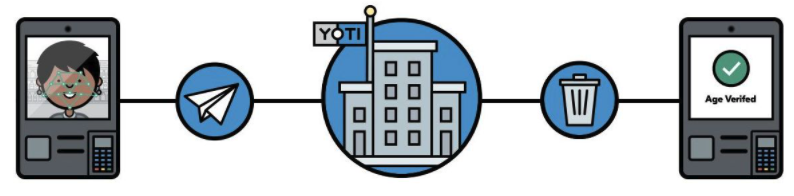
Facial age estimation overview
To read more about Age estimation and Liveness, please see our white papers.
Image requirements
Get better results by using our Face Capture Module(s).
Image requirements to use our services are:
| Condition | Description |
|---|---|
| Image resolution | The image must be 720p (1280x720 pixels) or 1080p (1920x1080 pixels) |
| Image format | PNG or JPEG (95 to 100 quality) Please avoid image format conversion to avoid degrade image quality |
| Single face image | We don't support multiple faces images |
| Ratio Face to Image | 35% to 80% of Face Box over the image size Note: A centred overlay will help you to send better images. It will avoid the users stay to close to the camera avoiding face distortions or too far from the camera where the face will be too small for the model analysis |
| Face size | The minimum face size is 150px |
| Face cropping | Based on Client Face detector adding padding |
| Face position | Face should be centred in the image |
| Image size | Min height/width 300 pixels Max height/width 2000 pixels |
| Colour | The image must be colour (RGB). Yoti does not accept black and white or filtered images. The greyscale threshold is 20 |
| Brightness | Brightness/darkness is measured by mean values of all the RGB pixels. The brightness threshold is 215. The darkness threshold is 40 |
| Size | The minimum image size is 50KB/90000 pixels size. The maximum image size is 1.5 MB/2100000 pixels size |
| Zero Pixels Ratio | The ratio threshold is 0.2 |
The best trade-off between users' experience and model performance is applying a ratio between the size of the Bounding Box Face and the image size.
There is also a tradeoff between estimation accuracy and camera quality / light conditions; false-negative errors such as face not detected or spoofing attempt detected may be higher than expected due to one or more of the following factors:
| Condition | Description |
|---|---|
| Lighting | Provide UX and guidance to the user. |
| Face positioning | Guide the users to place their face in the middle of the photo you are capturing. A near frontal pose with no obstruction to the facial features. The minimum inter ocular distance is 120 pixels. |
| Camera angle | Please try to get a face-on photo of the user to get the best result. The camera’s field of view is too small to provide suitable context around the facial image captured. |
| Camera type | The API does not work on infrared cameras. To ensure the best performance we are happy to support your testing when evaluating camera options. |
| Image cropping | Further image cropping can also reduce the context around the facial image captured. This can negatively impact the ability of the algorithm to compare to other ‘normal’ images in its learned model. |
| Glare / Blur | Insufficient anti-glare capabilities of either the lens or the glass will make it harder for the anti-spoofing to accurately detect edges around faces. This can negatively impact the ability of the algorithm to compare to other ‘normal’ images in its learned model. |
| Zoom | Optical zoom effects can reduce the context around the facial image captured. This can negatively impact the ability of the algorithm to compare to other ‘normal’ images in its learned model. A distorted lens structure, such as a ‘fish-eye’ lens which is not how the AI model has been trained. |
| Image compression | Too much image compression is applied to the captured image which creates ‘artefacts’ and inaccuracies in the image (ideally no more than 90% compression). This can negatively impact the ability of the algorithm to compare to other ‘normal’ images in its learned model. |
Using Yoti responsibly
We pride ourselves on how we handle our users' data. We use tech for good and enable users to securely prove their identity or age, always being transparent about what happens to their details.
- Be transparent about why you're collecting data and only use this data for those reasons.
- Only collect the information you actually need. Data minimisation is one of the main benefits of Yoti, so people don't have to provide more information than is actually necessary.
- Make sure any information you export to your own systems is stored securely. Data security is at the heart of what we do and we think it should be important to every organisation.