
This section covers how to integrate the In-Branch Verification API.
The main steps are outlined below:
Get applicant information
Session creation (transaction requirement definition)
In this step, you define what document types are required or accepted from your applicant, as well as which validation and verification services you would like to use as part of the identity verification. These include
Post Office branch sighted and digitised documents with applicant face capture
Document validation
Biometric facial matching of the applicant's image to the photo ID
Text extraction
Claimed identity matching (roadmap feature)
Third-party identity and address verification (Comply Advantage)
Applicant guidance and preparation (‘At home experience’)
The aim is to facilitate the in branch service by ensuring the user has what they need before arrival
They will:
Give their contact information, pick a location and decide what documents to bring.
The user will receive a PDF of instructions / a summary of the choices they made with where to go and what to bring.
In branch flow
The aim is to go into the branch with your documents and instructions:
Pass the documents to the branch, complete IDV check.
Take a photo of the user.
Receive a confirmation receipt.
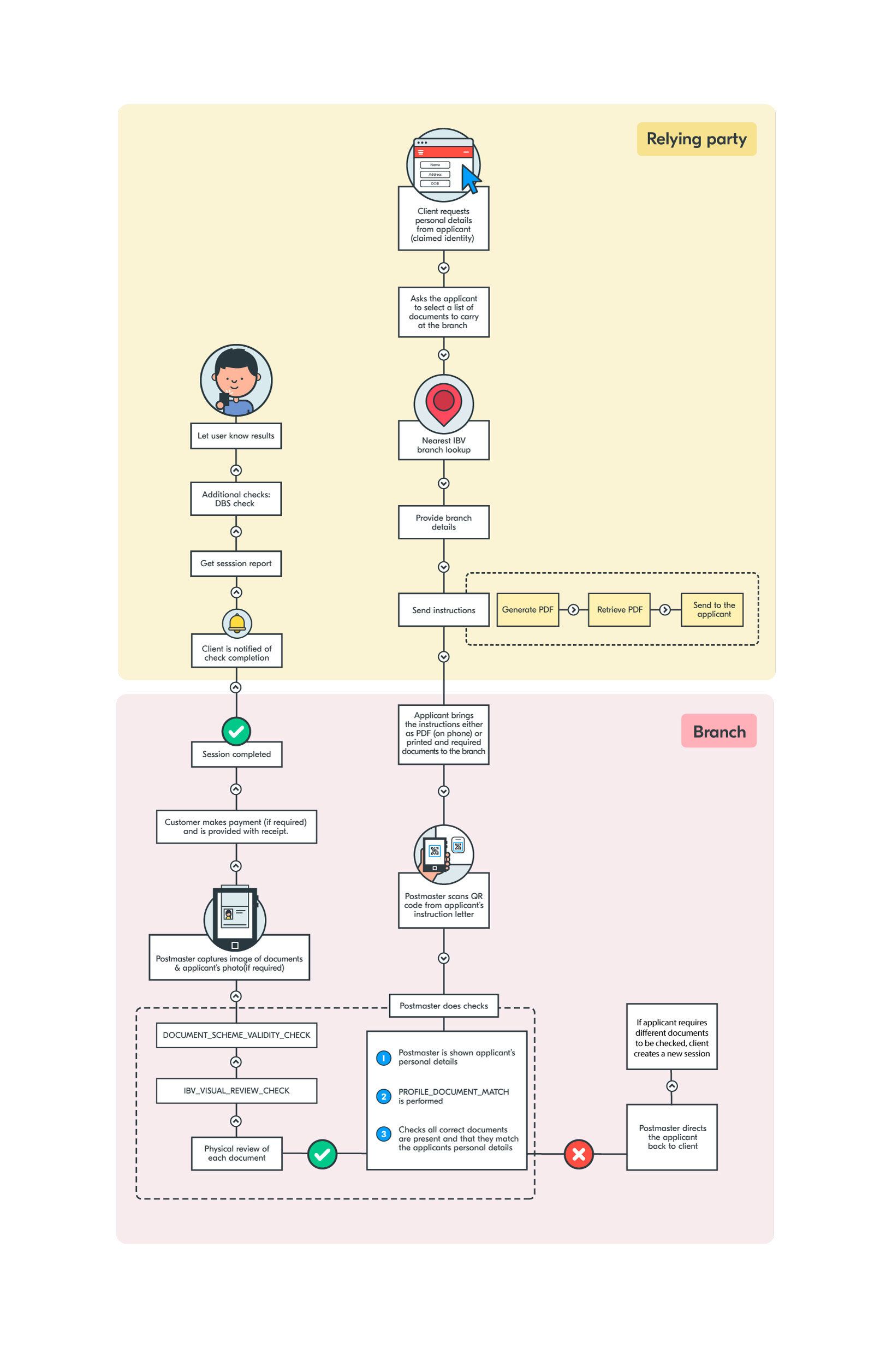
Feature List
Below is a list of features specific to an In-Branch verification:
In-person document checking with configurable automated identity verification and third party checks
Broad range of supported documents, including configurable for DBS document checking
Evidence digitisation and applicant photo for anti-impersonation mitigation
Configurable client report including check results, copies of evidence and applicant photo
Billing on account or by applicant in branch
Integration, Testing & Go Live Process
Create a production application on the Yoti hub for integration testing.
Integrate and complete internal testing
Create a new production application on the Yoti hub for your production service
Demonstrate and receive approval to go live from Post Office or Yoti [Mandatory]
For more information about this process and scheduling the demonstration and approval please enquiry through support.yoti.com.
Supported Documents
You can retrieve a comprehensive list of supported 'ID' documents by making a GET request to our API endpoint: https://api.yoti.com/idverify/v1/supported-documents.
Please note that our in-branch service might not support all document types and countries. If you have any questions regarding specific documents, reach out to us at https://support.yoti.com/yotisupport/s/contactsupport.
For 'Supplementary Document' support, refer to the table provided below.
Backend name | Document | Yoti type | Objective |
|---|---|---|---|
PASSPORT | Passport | ID | N/A |
DRIVING_LICENCE | Driving License | ID | N/A |
NATIONAL_ID | National ID | ID | N/A |
RESIDENCE_PERMIT | Biometric Residence Permit | ID | N/A |
UTILITY_BILL | Utility Bill | Supplementary doc | UK_DBS / PROOF_OF_ADDRESS |
COUNCIL_TAX_BILL | Council Tax Bill | Supplementary doc | UK_DBS / PROOF_OF_ADDRESS |
PHONE_BILL | Phone Bill | Supplementary doc | UK_DBS / PROOF_OF_ADDRESS |
BANK_STATEMENT | Bank Statement | Supplementary doc | UK_DBS / PROOF_OF_ADDRESS |
BANK_STATEMENT | Credit Card Statement | Supplementary doc | UK_DBS |
MILITARY_CARD | HM Forces ID Card | Supplementary doc | UK_DBS |
SUPPLEMENTARY_PASS_CARD | PASS Card | Supplementary doc | UK_DBS |
FIREARMS_LICENCE | Firearms Licence | Supplementary doc | UK_DBS |
BIRTH_CERTIFICATE___ISSUED_WITHIN _12_MONTHS_OF_BIRTH | Birth Certificate (within 12 months of DOB) | Supplementary doc | UK_DBS |
BIRTH_CERTIFICATE | Birth Certificate (issued after 12 months from DOB) | Supplementary doc | UK_DBS |
ADOPTION_CERTIFICATE | Adoption Certificate | Supplementary doc | UK_DBS |
PAPER_DRIVING_LICENCE | Paper Driving Licence | Supplementary doc | UK_DBS |
MARRIAGE_CERTIFICATE | Marriage/Civil Partnership Certificate | Supplementary doc | UK_DBS |
ACCOUNT_OPENING_LETTER | Bank Opening Letter | Supplementary doc | UK_DBS |
BENEFIT_STATEMENT | Benefit Statement | Supplementary doc | UK_DBS |
MORTGAGE_STATEMENT | Mortgage Statement | Supplementary doc | UK_DBS |
FINANCIAL_STATEMENT | Financial Statement | Supplementary doc | UK_DBS |
EMPLOYEE_TAX_FORM | P45 or P60 Statement | Supplementary doc | UK_DBS |
EMPLOYMENT_SPONSORSHIP_LETTER | Employment Sponsorship Letter | Supplementary doc | UK_DBS |
IMMIGRATION_DOCUMENT | Immigration Document/Visa/Work Permit | Supplementary doc | UK_DBS |
EDUCATION_LETTER | Education Letter | Supplementary doc | UK_DBS |
DVLA_FORM | DVLA V5 or V5C/2 | Supplementary doc | UK_DBS |
VETERAN_CARD | Veteran Card | Supplementary doc | UK_DBS |
HEALTH_INSURANCE_CARD | Health Insurance Card | Supplementary doc | UK_DBS |
TAX_NOTIFICATION | Tax Notification | Supplementary doc | UK_DBS |
Service options
There are a couple of options regarding ID verification via the in branch verification (IBV) service:
Supplying a 'claimed ID' where you have gathered a user's details (i.e. name, address and date of birth) and would like the document validation to be done to ensure a match to these attributes. We ask that you supply these details as part of the request for branch verification (session creation).
If you do not provide the 'claimed ID' then you can either:
Receive document images from the session for processing by your organisation,
Utilise our data extraction and comparison feature to provide the verified 'resultant ID' to you
Claimed ID
In a claimed ID request, you will already have information about the individual e.g name that you will have collected from the applicant. The applicants details will be sent in your request, where the postmaster will then check that these details match that on the ID documents brought in.
Resultant ID
In a resultant ID request, you will not necessarily need information on the applicant already. The checks done are on the documents brought in and the data on the documents can be returned to you.
Embedded UX vs Hosted 'At Home Flow'
Where your organisation has business rules requiring sets of documents to be provided in order to meet your requirements (ie. Disclosure & Barring Service), then we recommend you manage the users document selection within your own UX and create sessions via our API.
If your organisation has more simple evidence rules then you may wish to use the hosted UX that we make available to enable your users to select documents and receive the applicant letter.
For more information about these options, please contact enquiry through support.yoti.com
Organisation billed vs applicant payment
The in branch service will bill for completed branch verification sessions at the end of each calendar month, but also provides an optional feature to collect payments from your applicants in branch to offset these fees, or to also capture and remit additional fees that you may require. Your organisation will be required to register for branch payment remittance and there is a transactional fee to utilise this feature.
For more information, please contact your account manager.
Applicant experience
Post Office provides 270+ different products and services within it's branches, so it's critical for your applicant and the Post Office branch staff, that the language we use to describe our services and the way that you refer to our services is consistent. For example:
DO: "Select your documents for your Post Office In-Branch Verification". "Ensure you bring the provided Post Office In Branch Verification letter and your documents to an enabled branch",
DON'T: "Get ready to prove your ID to Post Office.", "Get your documents checked by Post Office", or "Get verified by Post Office."
When referring to the service, please ensure that you use the full product name of "Post Office In-Branch Verification."
The supplied PDF should be referred to as the 'In Branch Verification letter', as opposed to a form or application as these terms have a different meaning for Post Office branch staff. Avoid using the terms "certified" or "document certification" as these refer to a different service (Post Office Document Certification Service)
The Post Office In-Branch Verification service is only available in Identity-enabled branches, which are available and accessible to 98% of the UK population within 10 miles of their residential address. It is critical for applicants to be directed to their nearest or most convenient enabled Post Office branch, which is why the Post Office has made it's Location & Data Services API available to use to retrieve branch information and for this selected branch to be included on the In-Branch Verification letter.