
Search
Once you've set up your organisation account on the Yoti Hub, you’re ready to start integrating with Yoti. This section explains how to complete a basic mobile integration.
Good to know
Our mobile SDKs (iOS/Android/React Native) do not support sandbox keys.
Before you start
You need to have a completed backend component of the web integration setup before you're able to complete a mobile integration.
Technical overview
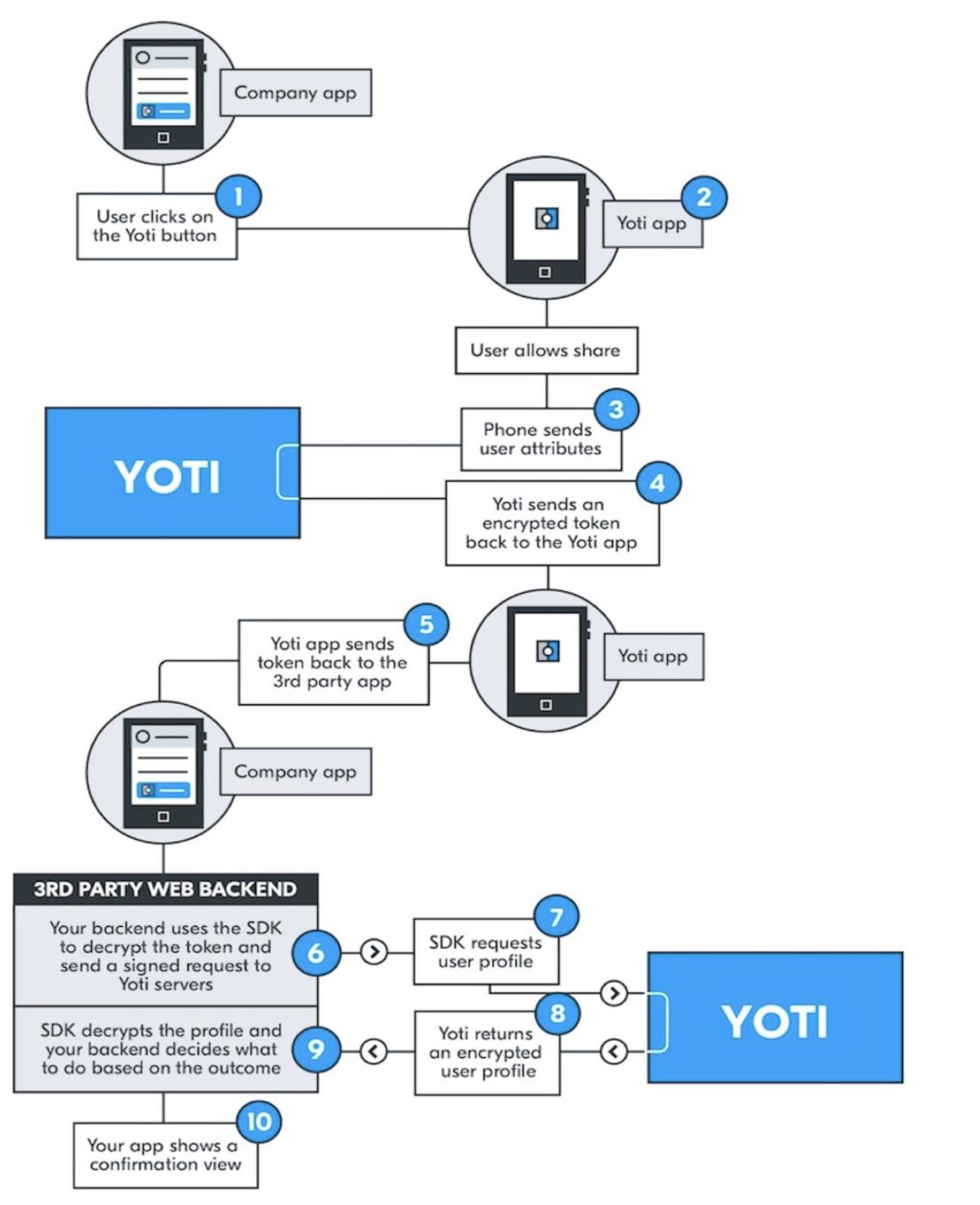
The diagram below describes the mobile process and how your backend integrates with the Yoti architecture.
Mobile examples
The mobile integrations that we currently support are listed below for the Yoti App integration. Please select your preferred language to continue.
iOS (Swift & Objective C) - Minimum deployment target version 9.0 or above
Android - Min Android version 4.0.3 or above
Good to know
If you want to use Yoti with other mobile application development frameworks, you have to make sure they support receiving a broadcast message from an external native app. The Cordova / Ionic platforms currently don’t have official support for it.
Was this page helpful?