Welcome to the developer documentation for integrating the In-Branch verification service.
The documentation has recently been revised. Should you need the earlier version, it's available here. Please note, there have been no modifications to the API.
You can integrate this service by API.
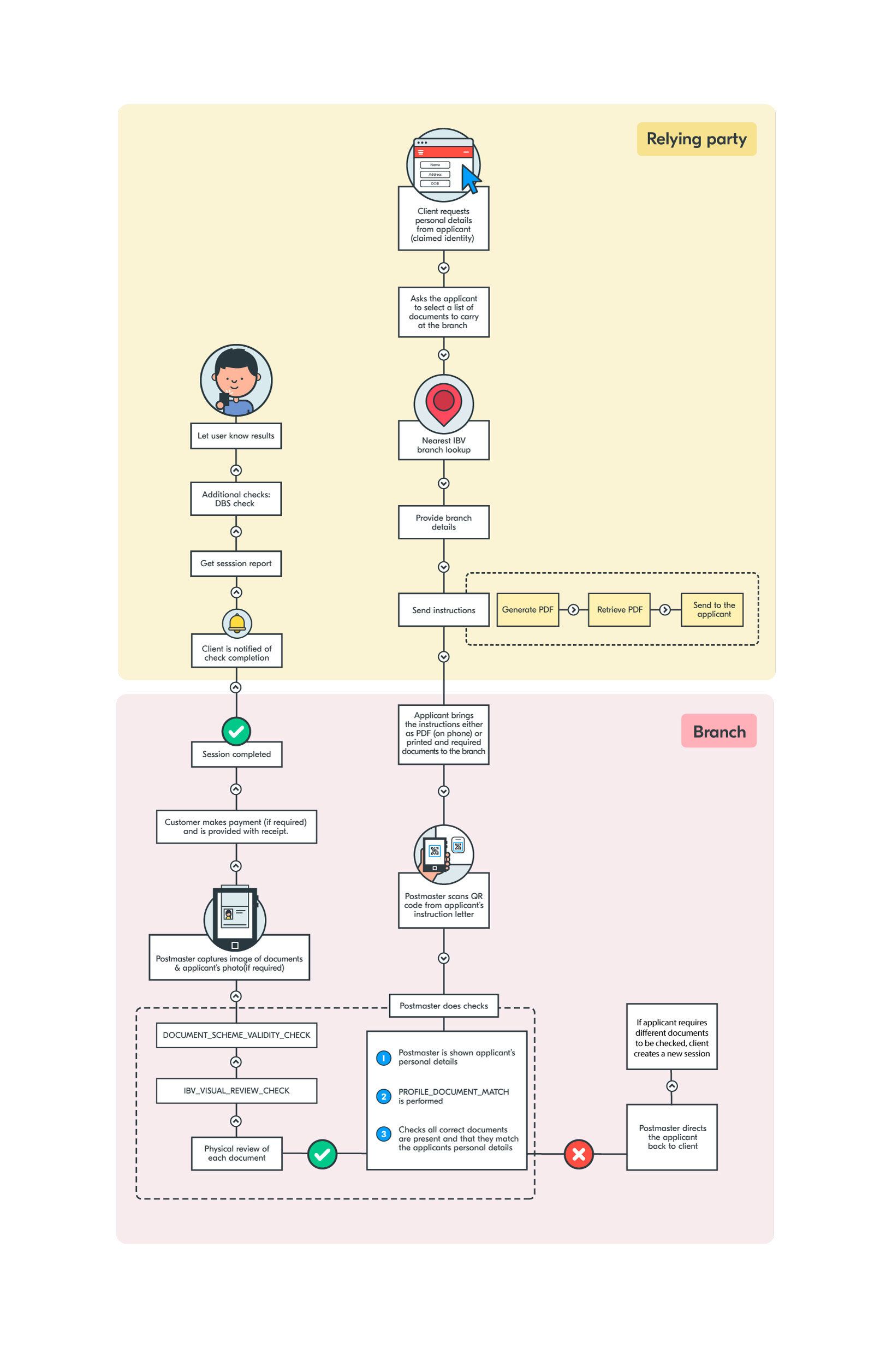
The overview below details the entities and data flows.
If you need any help please contact us here.
You will need to have registered your business with Yoti.
In-Branch Verification is a service for organisations who require In-person identity verification and document validation. This service will use Yoti's Identity verification capability combined with a face-to-face transaction to provide identity and proof of address document validation and identity verification to clients who require additional assurance to meet business risk or regulatory obligations, or to customers who require the additional assistance that a branch can provide.
In-Branch Verification is also used to facilitate Identity checking through the DBS documents-based route.
Feature List
Below is a list of features specific to an In-Branch verification:
In-person document checking with configurable automated identity verification and third party checks
Broad range of supported documents, including configurable for DBS document checking
Evidence digitisation and customer photo for anti-impersonation mitigation
Configurable client report including check results, copies of evidence and customer photo
Billing on account or by customer in branch
Integration, Testing & Go Live Process
Create a production application on the Yoti hub for integration testing.
Integrate and complete internal testing
Create a new production application on the Yoti hub for your production service
Demonstrate and receive approval to go live from Post Office or Yoti [Mandatory]
For more information about this process and scheduling the demonstration and approval please enquiry through support.yoti.com.
Supported Documents
You can retrieve a comprehensive list of supported 'ID' documents by making a GET request to our API endpoint: https://api.yoti.com/idverify/v1/supported-documents.
Please note that our in-branch service might not support all document types and countries. If you have any questions regarding specific documents, reach out to us at https://support.yoti.com/yotisupport/s/contactsupport.
For 'Supplementary Document' support, refer to the table provided below.
Document | Backend name | Yoti type |
|---|---|---|
Passport | PASSPORT | ID |
Driving license | DRIVING_LICENCE | ID |
National ID | NATIONAL_ID | ID |
Biometric Residence Permit | RESIDENCE_PERMIT | ID |
Utility bill | UTILITY_BILL | Supplementary doc |
Bank statement | BANK_STATEMENT | Supplementary doc |
Council tax bill | COUNCIL_TAX_BILL | Supplementary doc |
Phone bill | PHONE_BILL | Supplementary doc |
HM Forces ID Card | MILITARY_CARD | Supplementary doc |
PASS Card | SUPPLEMENTARY_PASS_CARD | Supplementary doc |
Firearms Licence | FIREARMS_LICENCE | Supplementary doc |
Birth Certificate (within 12 months of DOB) | BIRTH_CERTIFICATE_ISSUED_WITHIN_12_MONTHS_OF_BIRTH | Supplementary doc |
Birth Certificate (issued after 12 months from DOB) | BIRTH_CERTIFICATE | Supplementary doc |
Adoption Certificate | ADOPTION_CERTIFICATE | Supplementary doc |
Paper Driving Licence | PAPER_DRIVING_LICENCE | Supplementary doc |
Marriage/Civil Partnership Certificate | MARRIAGE_CERTIFICATE | Supplementary doc |
Bank Opening Letter | ACCOUNT_OPENING_LETTER | Supplementary doc |
Benefit Statement | BENEFIT_STATEMENT | Supplementary doc |
Mortgage Statement | MORTGAGE_STATEMENT | Supplementary doc |
Financial Statement | FINANCIAL_STATEMENT | Supplementary doc |
P45 or P60 Statement | EMPLOYEE_TAX_FORM | Supplementary doc |
Employment Sponsorship Letter | EMPLOYMENT_SPONSORSHIP_LETTER | Supplementary doc |
Immigration Document/Visa/Work Permit | IMMIGRATION_DOCUMENT | Supplementary doc |
Education letter | EDUCATION_LETTER | Supplementary doc |
DVLA V5 or V5C/2 | DVLA_FORM | Supplementary doc |
User Journey (Diagram)