
When a user visits a restricted content website, they’re sent to the Age Verification Service to verify their age. Yoti identifies the content provider, the age requirement, and any criteria specified for the verification. With this information, Yoti create a credential subject that contains the age token and a credential proof that contains a digital signature that proves the credential was issued by Yoti.
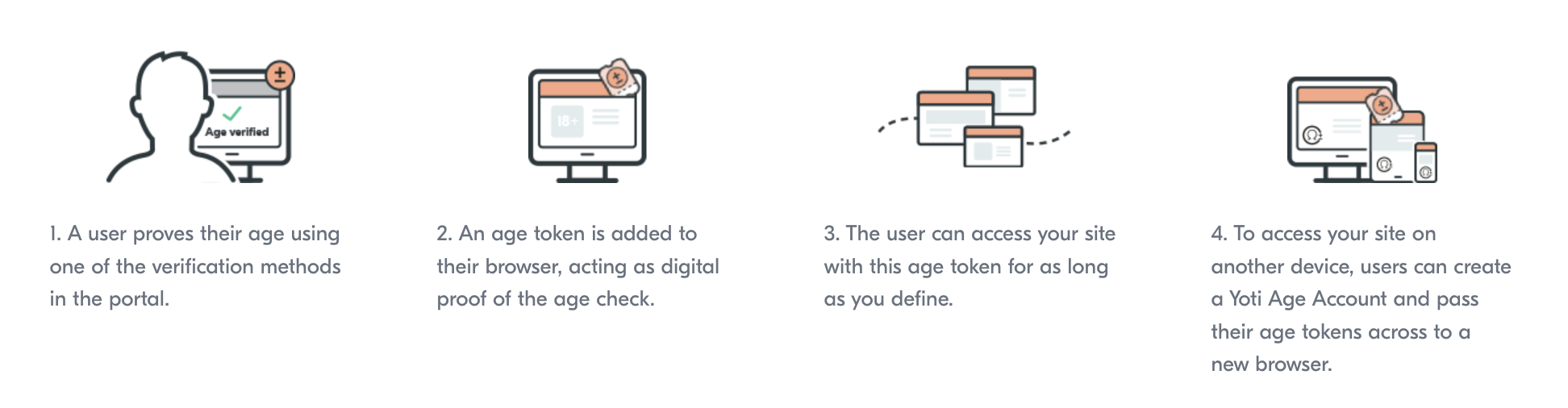
When the user lands on your site there will be a token request, a check is performed to see if the user has an age claim that matches your requirements.
If a user doesn’t have a token that meets your requirements, they’ll be sent through the age verification process to prove their age again. You will need to add rules to your configuration. This can be done by creating a specific rule ID, or by simply using your session creation payload as the requirements.
Yoti Key Method
Yoti Keys represent Yoti’s version of a passkey - a secure, user-friendly method for accessing websites and apps. Designed to replace traditional username and password authentication, passkeys use biometric data to ensure a seamless and secure login experience for users.
A passkey is made of two parts, which are cryptographically linked - a private key (stays in your passkey vault) and a public key (stored on a website). Neither key is useful without the other, so this adds an extra layer of security should a data breach occur.
Yoti Keys is a reusable age verification solution that only contains information on the initial age check, such as the age method used and the time the age token was created.
Each Yoti Key stores only non-personalised age verification data (like method and timestamp), making it privacy-first and regulation-friendly.
Key Benefits:
Reduce friction for returning users
Protect privacy and anonymity
Flexible and customisable to meet global regulatory requirements (each website defines its own criteria for accepting a Yoti Key, in line with its regulatory requirements)
Enhance trust and safety
Privacy-first approach
Only need to integrate with one Yoti AVS method to use Yoti Keys
Can be used across linked devices
You will need to configure the yoti_key method to enable the age token functionality.
Field | Types/Value | Description |
|---|---|---|
allowed |
| Enable the verification method to be available for the user to use. |
authentication |
|
|